利用 GUI 实现一个计算器。点击一个按钮时,显示屏应该显示相应的数字。
涉及计算的逻辑较为简单,不能完整实现正常计算器的全部功能。
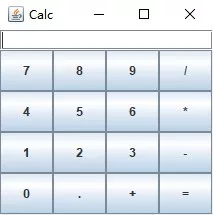
CalculatorFrame.java
  1
  2
  3
  4
  5
  6
  7
  8
  9
 10
 11
 12
 13
 14
 15
 16
 17
 18
 19
 20
 21
 22
 23
 24
 25
 26
 27
 28
 29
 30
 31
 32
 33
 34
 35
 36
 37
 38
 39
 40
 41
 42
 43
 44
 45
 46
 47
 48
 49
 50
 51
 52
 53
 54
 55
 56
 57
 58
 59
 60
 61
 62
 63
 64
 65
 66
 67
 68
 69
 70
 71
 72
 73
 74
 75
 76
 77
 78
 79
 80
 81
 82
 83
 84
 85
 86
 87
 88
 89
 90
 91
 92
 93
 94
 95
 96
 97
 98
 99
100
101
102
103
104
105
106
107
108
109
110
111
112
113
114
|
import java.awt.BorderLayout;
import java.awt.GridLayout;
import java.awt.event.ActionEvent;
import java.awt.event.ActionListener;

import javax.swing.*;

/**
 * calculator panel.
 */
public class CalculatorFrame extends JFrame {
    String lastCommand = "=";
    double result = 0;
    JTextField display = new JTextField();
    boolean start = true;

    public CalculatorFrame() {
        setTitle("calc");
        setSize(300, 200);
        setLocation(380, 300);
        setDefaultCloseOperation(EXIT_ON_CLOSE);
        setVisible(true);

        // Add the display

        add(display, BorderLayout.NORTH);

        // Define all Buttons
        JButton btnAdd = new JButton("+");
        JButton btnSub = new JButton("-");
        JButton btnMul = new JButton("*");
        JButton btnDiv = new JButton("/");
        JButton btnDot = new JButton(".");
        JButton btnEqu = new JButton("=");

        btnAdd.addActionListener(new ArithmaticListener());
        btnSub.addActionListener(new ArithmaticListener());
        btnMul.addActionListener(new ArithmaticListener());
        btnDiv.addActionListener(new ArithmaticListener());
        btnEqu.addActionListener(new ArithmaticListener());

        JButton[] btnNums = new JButton[10];
        for (int i = 0; i < 10; ++i) {
            btnNums[i] = new JButton("" + i);
            btnNums[i].addActionListener(new NumberInputListener());
        }
        btnDot.addActionListener(new NumberInputListener());

        // Add the number pad
        JPanel p = new JPanel();
        // Set 4*4 Grid Layout
        p.setLayout(new GridLayout(4, 4));
        p.add(btnNums[7]);
        p.add(btnNums[8]);
        p.add(btnNums[9]);
        p.add(btnDiv);

        p.add(btnNums[4]);
        p.add(btnNums[5]);
        p.add(btnNums[6]);
        p.add(btnMul);

        p.add(btnNums[1]);
        p.add(btnNums[2]);
        p.add(btnNums[3]);
        p.add(btnSub);

        p.add(btnNums[0]);
        p.add(btnDot);
        p.add(btnAdd);
        p.add(btnEqu);
        add(p, BorderLayout.CENTER);
        pack();
    }

    class NumberInputListener implements ActionListener {

        @Override
        public void actionPerformed(ActionEvent e) {
            String num = e.getActionCommand();
            if (start) {
                display.setText(num);
                start = false;
            }
            else
                display.setText(display.getText()+num);
        }
    }

    class ArithmaticListener implements ActionListener {

        @Override
        public void actionPerformed(ActionEvent e) {
            start = true;
            String command = e.getActionCommand();
            double output = Double.parseDouble(display.getText());
            if (lastCommand.equals("+"))
                result += output;
            else if (lastCommand.equals("-"))
                result -= output;
            else if (lastCommand.equals("*"))
                result *= output;
            else if (lastCommand.equals("/"))
                result /= output;
            else if (lastCommand.equals("="))
                result = output;
            display.setText(""+result);
            lastCommand = command;
        }
    }
    public static void main(String[] args) {
       new CalculatorFrame();
    }
}
|